
AI
How To Take Your Own Passport Photo

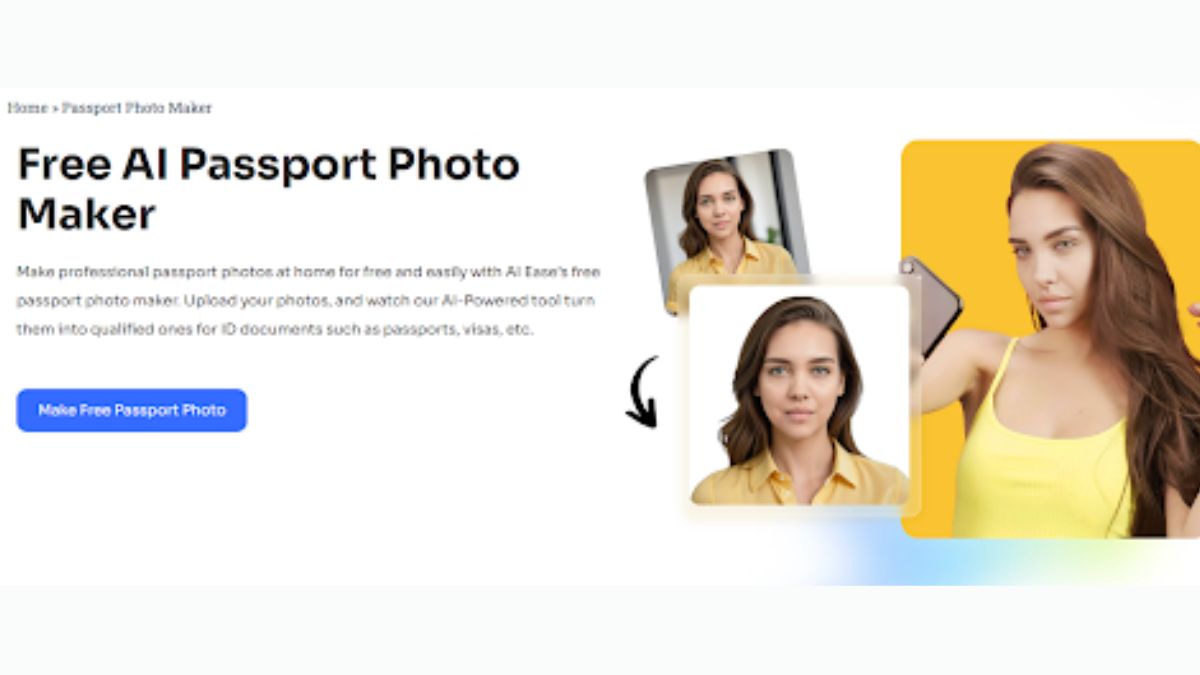
One important aspect of the process for a passport application or renewal is the photo that goes with the document. While several people have gone to photo studios to have professional-looking photos taken, taking a passport photo at home is just fine.
Having a passport photo made was nonetheless pretty easy with some fundamental guiding and advanced tools such as AI Ease Passport Photo Maker. In the following paragraph, we will elaborate more about how you could just shoot your own passport pictures along with explaining why our Passport Photos online tool is considered one the top solution.
How to Take a Passport Photo?
Taking your passport photo yourself is quite an exacting process. Passport photos have to meet certain criteria in terms of size, composition, and quality. Here’s what you should keep in mind to avoid the risk of rejection:
-
Body-Camera Distance for Passport Pic
Framing has to do with distance from the camera. The distance should be about 20 inches away from your face, about 50 centimeters. Your head and shoulders will fit in the required dimensions at this distance. Let someone else take the photo of you for you because that allows for a steady and centered photo.
If using a tripod or self-timer, make sure the camera does not move and is appropriately positioned. A shaky shot can result in a blur, which may lead to rejection.
-
Posture for a Passport Picture
Your posture is important to the requirements in a passport photo. You need to be standing upright with your face to the camera. Keep the head straightforward, shoulders squarish to the camera, mouth closed, eyes open.
This will help in ensuring that you avoid angles that distort your features by having the camera at eye level. You look right into the lens to make sure it captures your full face and captures it clearly and proportionally.
-
Best Lighting for Passport Photos
Lighting can make a big difference in the quality of your passport photo. Stand with your face facing a bright light source, such as from an open window, and evenly light up your face. If the light happens to be too strong or at some angle, it will show marked shadows. Backlighting and dim lighting create poor contrast, which may get rejected.
Moreover, this step is eased by the fact that the AI Ease passport photo maker automatically adjusts and removes the background to make your photo fit the official standards.
Why use AI Ease Passport Photo Maker?
The AI Ease passport photo maker makes taking your passport photo a whole lot easier. This advanced online tool will make the process easy for you while it automatically handles all the technical adjustments, keeping in mind the official requirements. Here’s how it works:
Step 1: Select Country and Photo Type
Just select the country or region and the photo type you want to make. There are different kinds of passport photo requirements for each country, such as width and height, background color, and resolution, all incorporated into our Passport Photo Maker preset for you, without having to manually adjust them.
Step 2: Attaching Your Photo
Take a clear photo following the guidelines above or upload an existing picture from your device. The photo should be high quality, well-lit, and against a plain background. Let the passport photo maker process it into a professional-grade passport picture.
Step 3: AI Process
Once uploaded, our AI technology analyzes your photo and automatically makes the necessary adjustments. It resizes the image, centers your face, and removes any distracting background elements. You can preview the final product, select the appropriate paper size for printing, and download the finished photo.
Key Features of our Passport Photo Maker
- Free, fast, online tool: The AI Ease passport photo maker is completely free, and you can use it from any device. This process is fast because, within minutes, you’ll get to create a compliant passport photo.
- Supports a wide variety of countries and regions: Be that a U.S. passport, UK visa, or any other official document, our tool supports the photo requirements of numerous countries around the world.
- Pre-set tools to size and background: Our tool will automatically resize your photo to the perfect size and background, in tune with the official requirements for the most recent passport photo.
Benefits of Taking Your Own Passport Photo
Following are the advantages of taking your passport photo at home:
- Convenience: No need to bother with going to a photo studio or kiosk; with the AI Ease passport photo maker, take your picture anywhere and at any time.
- Free to use: Professional passport photos cannot be cheap. Our ultimate tool will enable you to do quality passport photos without any cost implications.
- Control: You can have reruns of taking the photo until you feel comfortable with your result.
- Instant results: AI Ease passport photo maker doesn’t let a single second go to waste and speeds up finishing your passport application.
Common Mistakes to Avoid When Taking Passport Photos
To ensure that your passport photo is accepted, here are several common mistakes to avoid:
- Spectacles: Most countries do not allow spectacles in passport photos anymore. Always remove them for compliance with the rules.
- Incorrect dressing: Avoid uniforms or clothes that join with the back. Contrasting colors against solids is helpful to stand out.
- Poor lighting: Bad lighting can cause shadows, glare, or uneven exposure and may lead to rejection.
- Face Expression: Keep your facial expression neutral. Smiling, frowning, and tilting of the head will make the photo not compliant.
Why choose AI Passport Photo Maker?
Our passport photo maker is designed to make the whole process quite seamless. We make use of advanced AI technology, which cuts out all the guesswork in making a compliant passport photo. Here’s why you should choose AI Ease:
- Photo Accuracy: Our tool ensures your photo will meet the latest passport and visa photo requirements – domestic or international.
- Flexibility: Use the tool for different purposes, be it a passport, visa, or some other official document.
- User-friendly interface: All is intuitive, even for the most unskilled.
- Background removal – automatic: AI will automatically clear and tailor it according to requirements.
Printing Tips for Your Passport Photo
Once you have created and downloaded your photo using our passport photo maker, proper printing is the last mile. Here’s how to do it:
- Print on good paper: Use glossy or matte photo paper for printing your photo to achieve the best results.
- Verify the size: Make sure the photograph is printed in the correct size as required by your country’s laws.
- Avoid editing further, because doing more editing or using filters could affect the compliance of your photo with the requirements for such documents.

Conclusion
Taking your passport photo yourself is just as easy, as long as proper guidelines are followed. Keeping in mind the distance, posture, and lighting, a professional and compliant photo could be taken right from your home with the help of advanced tools like the AI Ease passport photo maker. Our online free tool offers a quick result in moments, accurate for the demand of your country. Our tool saves money, saves time, and puts every effort into giving a completely perfect passport photo, just enough to get approval for you.
AI face swapping has evolved from a novelty feature into a serious content creation tool. In 2026, creators will use face swap technology for marketing campaigns, social media content, video production, educational content, and creative storytelling.
After testing dozens of platforms across image and video workflows, I found that the best tools aren’t necessarily the ones with the most features. The best platforms deliver realistic results, fast processing, flexible editing options, and reasonable free plans.
The best AI face swap tool for most creators in 2026 is Magic Hour thanks to its image and video capabilities, ease of use, and consistently realistic results.
If you’re searching for a free solution without watermarks, this guide compares the leading options available today.
Best AI Face Swap Tools at a Glance
| Tool | Best For | Images | Videos | Free Plan | No Watermark Option | Platform |
| Magic Hour | Overall best | Yes | Yes | Yes | Yes | Web |
| Reface | Mobile content creation | Yes | Yes | Limited | Paid | iOS, Android |
| Face Swap Live | Live face effects | Yes | Video | Limited | Paid | Mobile |
| DeepSwap | Social media creators | Yes | Yes | Limited | Yes | Web |
| Akool | Marketing teams | Yes | Yes | Yes | Yes | Web |
| Vidnoz | AI video production | Yes | Yes | Yes | Yes | Web |
| Remaker AI | Budget-conscious users | Yes | Limited | Yes | Yes | Web |
| MioCreate | Quick face swaps | Yes | Yes | Yes | Yes | Web |
| Swapface | Streamers | Limited | Live Video | Free | Yes | Desktop |
| FaceFusion | Open-source users | Yes | Yes | Free | Yes | Desktop |
1. Magic Hour
When evaluating face swap platforms, I focused on image quality, realism, speed, ease of use, and output flexibility. Magic Hour consistently ranked at the top across all categories.
As the best AI face swap tool, it combines professional-grade results with a beginner-friendly workflow. Unlike many competitors that specialize only in images, Magic Hour supports both image and video face swaps while maintaining impressive realism.
The platform also offers a broader creative suite beyond face swapping. Users can access an ai image editor, video generation tools, and advanced content creation features from a single dashboard.
Pros
- Excellent image realism
- High-quality video face swaps
- Fast processing times
- Beginner-friendly interface
- Free plan available
- Multiple AI creative tools included
- No advanced editing skills required
Cons
- Premium features require subscription
- Large video projects can take time to render
During testing, Magic Hour consistently produced some of the most convincing results. Skin tones, facial expressions, and lighting transitions looked natural even when source images differed significantly.
If you need a platform that can handle both personal projects and professional content creation, this is difficult to beat.
Pricing: Free plan available. Paid plans unlock higher usage limits and advanced features.
2. Reface
Reface remains one of the most recognizable names in AI face swapping.
Originally known for viral face swap videos, the platform has expanded significantly and now offers image editing, animations, and content creation tools.
Pros
- Strong mobile experience
- Large template library
- Quick processing
- Beginner-friendly
Cons
- Watermarks on some free outputs
- Limited customization options
- Subscription required for full access
Reface excels when speed matters. If you’re creating social media content on your phone, it’s one of the easiest tools available.
Pricing: Free version available with premium subscription options.
3. DeepSwap
DeepSwap focuses heavily on realistic face replacement across images and videos.
The platform has become popular among creators who need higher-quality outputs without learning complex editing software.
Pros
- Realistic outputs
- Supports videos and photos
- Simple workflow
- Fast rendering
Cons
- Limited free credits
- Fewer editing controls
I found DeepSwap particularly effective when working with portrait photography and short-form video content.
Pricing: Credit-based and subscription plans available.
4. Akool
Akool targets marketers, agencies, and businesses that need AI-powered content generation at scale. Its face swapping capabilities are combined with avatar generation and AI video production tools, allowing users to create engaging visual content and even make photo talk online with realistic AI-powered animations and voice synchronization.
Pros
- Enterprise-friendly
- Strong video capabilities
- Team collaboration features
- Marketing-focused workflows
Cons
- Learning curve for beginners
- Some features geared toward businesses
For commercial content production, Akool offers a compelling mix of automation and quality.
Pricing: Free trial available with paid business plans.
5. Vidnoz
Vidnoz has rapidly expanded beyond AI avatars into a broader content creation platform.
Its face swapping tools integrate naturally with AI video production workflows.
Pros
- AI video ecosystem
- Easy-to-use interface
- Free plan available
- Fast processing
Cons
- Face swap tools not as advanced as top specialists
- Limited advanced controls
Creators focused on video content will appreciate the seamless workflow.
Pricing: Free and premium plans available.
6. Remaker AI
Remaker AI has gained attention for providing surprisingly good results without charging premium pricing.
It focuses on accessibility and simplicity.
Pros
- Generous free usage
- Easy interface
- Fast outputs
- No steep learning curve
Cons
- Limited advanced editing
- Inconsistent results on challenging images
For casual users and occasional creators, Remaker AI offers strong value.
Pricing: Free tier available.
7. MioCreate
MioCreate emphasizes speed and convenience.
Users can upload images and generate face swaps within minutes.
Pros
- Fast workflow
- User-friendly
- Supports multiple formats
- Free plan
Cons
- Fewer professional features
- Output quality varies
This platform works well for quick social media experiments and creative projects.
Pricing: Free and paid plans available.
8. Face Swap Live
Face Swap Live remains unique because of its real-time capabilities.
Instead of only processing uploads, it allows live face replacement effects.
Pros
- Real-time effects
- Mobile-friendly
- Fun interactive features
Cons
- Less suitable for professional projects
- Quality lower than leading AI tools
This is best suited for entertainment rather than commercial production.
Pricing: App purchase and subscription options.
9. Swapface
Swapface has become a favorite among livestreamers and content creators.
Its desktop software supports live face swapping during broadcasts.
Pros
- Excellent for streaming
- Real-time performance
- Creator-focused
Cons
- Requires desktop setup
- Limited image editing capabilities
If you’re active on streaming platforms, Swapface offers unique advantages.
Pricing: Free version available.
10. FaceFusion
FaceFusion stands out because it’s open-source.
For technically inclined users, it offers impressive flexibility and customization.
Pros
- Completely free
- Open-source
- Advanced customization
- Active community
Cons
- Technical setup required
- Not beginner-friendly
Developers and power users will appreciate the level of control available.
Pricing: Free.
How We Chose These Tools
I evaluated each platform using the same testing framework.
Image Quality
The first priority was realism. I tested portrait photos, group images, different lighting conditions, and varying image resolutions.
Video Performance
Video face swaps are considerably more challenging than static images. Tools that maintained consistency across frames scored higher.
Ease of Use
A powerful tool isn’t helpful if users struggle to operate it. I measured onboarding speed and workflow simplicity.
Processing Speed
Fast turnaround times matter for creators and marketing teams working under deadlines.
Free Plan Value
Since many readers are searching for free options, I examined what each platform actually offers before requiring payment.
Content Creation Ecosystem
Platforms received additional consideration if they integrated face swapping with broader creative tools.
For example, Magic Hour combines face swapping with features such as an <a href=”https://magichour.ai/products/ai-image-editor”>ai image editor with prompt free</a> workflows, making it easier to build complete content pipelines rather than relying on multiple tools.
The Face Swap Market in 2026
The face swap industry has matured significantly.
A few years ago, most tools focused on novelty effects. Today, creators use AI face swapping for:
- Marketing campaigns
- Product demonstrations
- Educational videos
- Social media content
- Personalized advertising
- Entertainment production
Another major trend is integration with video workflows.
Instead of treating face swapping as a standalone feature, platforms increasingly connect it with AI avatars, video generation, and animation systems.
For example, many creators combine face swaps with best AI lip sync tool free solutions to create fully animated talking characters without traditional production costs.
This convergence is likely to continue throughout 2026 and beyond.
Which Face Swap Tool Is Best for You?
Here’s my recommendation based on specific use cases:
| Use Case | Recommended Tool |
| Best overall | Magic Hour |
| Best for mobile users | Reface |
| Best for marketers | Akool |
| Best for video creators | Vidnoz |
| Best free option | FaceFusion |
| Best for streamers | Swapface |
| Best for beginners | Magic Hour |
| Best for businesses | Akool |
Final Takeaway
AI face swapping has become one of the most practical creative technologies available today.
While every platform on this list has strengths, Magic Hour stands out because it combines excellent image quality, strong video performance, an intuitive workflow, and a broader AI content creation ecosystem.
For most creators, marketers, and businesses, it offers the best balance between quality and usability.
That said, the ideal tool depends on your specific goals. I always recommend testing multiple options with your own content before committing to a platform.
The good news is that many of the leading tools now offer free plans, making experimentation easy.
FAQ
What is the best AI face swap tool in 2026?
Magic Hour is currently one of the strongest options thanks to its realistic outputs, video support, and comprehensive AI content creation features.
Are there free AI face swap tools without watermarks?
Yes. Several tools, including Magic Hour, FaceFusion, Remaker AI, and MioCreate, offer ways to create face swaps without visible watermarks under certain plans or usage limits.
Is AI face swapping legal?
In most jurisdictions, AI face swapping is legal when used responsibly and with proper permissions. Users should always respect privacy, consent, copyright, and platform policies.
Can AI face swap videos as well as photos?
Yes. Many modern platforms support both image and video face swaps. Video processing generally requires more computing power and advanced AI models.
What should I look for in a face swap tool?
Focus on image realism, video quality, processing speed, ease of use, pricing, and whether the platform supports your preferred content formats.

Research communities thrive on steady progress. Every new insight leans on earlier discoveries so access to a wide range of texts keeps work moving forward. When an e-library opens its doors to rare monographs and fresh studies it becomes a quiet partner in many breakthroughs.
Constant study shapes stronger ideas and ongoing education feels more manageable thanks to Zlibrary which gives scholars room to explore without extra hurdles. Many researchers say that steady reading routines help them stay grounded even when projects grow complex. The right source at the right moment often sparks a chain reaction of new questions.
The Role of Easy Access in Daily Research
Reliable access to varied material lets researchers shift gears fast. A morning spent with a classic like “The Structure of Scientific Revolutions” might lead to an afternoon review of new data sets or field reports. This rhythm builds a sense of momentum. Work flows with fewer roadblocks and each fresh insight can settle into place like a piece in a puzzle.
Z-library access also helps early career researchers find their voice. With many texts close at hand they gain confidence in framing arguments and testing theories. They shape stronger narratives because they see how others build theirs. Mentors often notice this growth during seminars or informal discussions. Curiosity deepens once the door to rich knowledge stays open. A short transition invites some practical notes:
-
Extended search habits
Readers often hunt for sources that support creative leaps. A long search session can link old ideas with new methods. This habit expands the scope of many projects and offers space for trial and error. Careful review of contrasting viewpoints prepares a more resilient research plan.
-
Broad exposure to niche fields
Some fields evolve in small circles. Access to niche work keeps researchers in the loop even when studies appear outside mainstream networks. Many breakthroughs rise from these hidden pockets of thought. Continuous reading in these areas shapes sharper instincts and bold hypotheses.
-
Stable support for interdisciplinary work
Fields often cross paths and blend ideas. Historians work with climate data or engineers explore ethical debates. This mix strengthens modern scholarship. A steady source of wide ranging texts encourages cross pollination that lifts new theories above old boundaries.
These notes show how thoughtful reading habits become part of a long term research rhythm that builds steady progress day by day.
Growth Through Shared Knowledge
Community shapes strong research. When scholars trade insights sparked by wide reading their conversations sound more alive. A reference to “Silent Spring” during a roundtable might lead to an unexpected debate on policy. These exchanges show how shared access builds common ground. They also highlight how every field benefits from open doors to knowledge.
Wider access also supports collaboration across borders. A researcher in one region may follow the same sources as a partner far away. This alignment speeds joint projects. Goals stay clear and teams move in step. Even a short quote from a shared book can guide a task and help partners stay in tune.
A Steady Path Ahead
Research thrives on curiosity and patience. With broad access to reading material scholars keep ideas in motion and maintain a steady flame of discovery. The right text at the right moment feels like a friendly nudge and often that is enough to push a project into fresh territory.
Understanding What Voozon.com Is (And What It Isn’t)
At first glance, Voozon.com might look like just another website in a vast digital landscape — but what exactly is it? Based on available online data and automated site analysis, Voozon.com is a web domain that hosts general informational content covering topics such as lifestyle, business insights, and various articles on online growth and digital communication.
Unlike high-profile brands with clearly defined services (such as e‑commerce platforms or networking tools), Voozon.com doesn’t prominently market a specific product, app, or tool with clear functionalities on its homepage. Instead, the domain resembles a content publisher, featuring articles on diverse subjects with general informational value.
That broad scope has led to confusion online, where some people assume Voozon is a business tool, platform, or even a chat/social site — all of which, based on the available evidence, are not directly accurate for this domain.
What the Website Contains
When you visit Voozon.com, the primary experience is reading articles — a mix of blog posts on various topics, such as:
-
Online business growth
-
Digital communication strategies
-
Lifestyle and tech trends
-
Guides with practical tips
These articles are structured like editorial pieces, similar to many niche publishing sites. The content is not organized as a tool dashboard or interactive platform in the way that SaaS (Software as a Service) products are.
Importantly, the site uses secure web technologies — it loads over HTTPS with a valid SSL certificate — and is generally accessible.
Domain Age and Trust Signals
One of the first steps people take when evaluating a new website is to check how long it’s been around — and in the case of Voozon.com, the domain has been registered for a significant time. Scamadviser reports that the site’s registration dates back many years, and it uses security practices like SSL encryption. These factors contribute to a moderately positive trust score from automated checks.
At the same time, there are limitations to what these metrics can tell us. Domain ownership information is hidden through privacy services, which is not unusual for smaller sites — but it doesn’t help clarify who runs the platform or what their long‑term plan is.
Why People Search for Voozon.com
There are a few common reasons users encounter this domain:
-
Search curiosity: The name’s uniqueness prompts users to check what it is and whether it’s safe.
-
Mixed search results: Some search engines show Voozon alongside unrelated topics like entertainment or tools, causing confusion about its purpose.
-
Assumptions about services: Because the name sounds like many SaaS or digital tool brands, some assume it’s a business platform — but current evidence doesn’t strongly support that.
These search patterns reflect the broader internet ecosystem: unfamiliar domains naturally attract extra attention and verification searches.
Is Voozon.com Safe and Legitimate? A Look at Trust Factors
Any time a website is unfamiliar to visitors, safety questions arise — especially when users wonder about data privacy, visibility, or reliability. Let’s break down what the available insights say about Voozon.com’s safety.
Security Indicators
-
HTTPS / SSL Encryption: The site uses secure HTTPS, meaning connection data is encrypted. This is a baseline requirement for modern sites and suggests the site isn’t trying to intercept user data.
-
Domain Age: An older domain generally signals sustained presence; shorter‑lived domains are often associated with scam or phishing sites. Voozon.com’s extended registration history leans toward credibility.
-
Safety Ratings: Public automated checks (like ScamAdviser and site reputation lookups) typically rate it as safe to access without blatant malware or phishing warnings.
However, these ratings have limitations. They don’t measure business legitimacy — only whether the domain appears technically safe to visit. They also can lag behind real‑world changes.
Transparency and Ownership
One notable point is that the domain’s ownership details are privacy‑protected. That’s common with many small to mid‑sized web publishers, but it also means users can’t easily verify who’s behind the content or what their credentials are.
For many users, this lack of transparency warrants discretionary caution, especially when considering:
-
Sharing personal contact information
-
Signing up or subscribing
-
Engaging in business deals
When a site doesn’t clearly disclose ownership, mission, or team members, reputable sites usually provide such details prominently — and Voozon.com currently lacks that clarity.
What Voozon.com Is Not
It’s important to clear up some common misconceptions:
❌ Not a Social Chat or Networking Platform
Some similar‑sounding names like Vooz.co are chat services where users connect with strangers. That site is unrelated and serves a completely different purpose (text/video chat).
❌ Not a Traditional E‑Commerce Platform
Although some third‑party analyses hint that Voozon might offer marketing tools or business growth services, there’s no direct evidence that Voozon.com functions as a business dashboard, marketplace, or digital product suite in the way known platforms like Shopify or Wix do.
❌ Not a Recognized SaaS Tool
There’s no clear documentation, official product announcement, or verified toolset linked to Voozon that indicates it offers enterprise or SME business solutions — despite some third‑party descriptions claiming otherwise.
The Role Voozon.com Plays Today
Based on the evidence available:
✅ Voozon.com currently serves as an informational content site — publishing articles on a range of topics.
✅ It appears technically safe to visit, based on SSL and domain checks.
✅ It does not behave like a tool or platform with user accounts or dashboard features.
What it might evolve into depends on the future direction of its owners — but today, the safest interpretation is that it functions like a blog or general information hub.
How to Approach Voozon.com — Safe Practices
Whether you visit Voozon.com out of curiosity or research, here are some guidelines:
✔ Confirm you’re on the correct domain
There are similar names (like Vooz.co or Voozoon.com) that are unrelated. Always check the URL.
✔ Read content before acting
If the site asks for sign‑ups, subscriptions, or payments, read all terms carefully.
✔ Avoid entering sensitive personal data
With any informational site that lacks clear ownership disclosures, avoid sharing details like credit card information or government IDs.
✔ Use standard browser safety tools
Keep your antivirus and browser security features active to block any unexpected threats.
Final Thoughts: What Voozon.com Represents in the Digital Ecosystem
In a crowded online environment where domain names get discovered, indexed, and debated rapidly, Voozon.com stands as a curious case — not because it’s dangerous, but because it’s less clearly defined than many other sites consumers encounter.
Some key takeaways:
-
It’s not an obvious scam and seems technically safe to access.
-
It does not clearly offer distinct products or tools like SaaS platforms.
-
It functions mainly as a content aggregator/publisher with articles spanning various topics.
-
Users should approach it with typical caution due to limited transparency about ownership and purpose.
For those exploring new names or wondering about unfamiliar domains that pop up online, Voozon.com provides a case study in how digital curiosity meets sparse documentation — and why independent verification is always wise.
-

 TOPIC2 years ago
Glamorous and Radiant: Styling Trendy Pink Dresses for Special Occasions with Pureology Professional Hair Care
-

 TOPIC2 years ago
Top Tips for Cleaning Your Outdoor Patio Rug
-

 TOPIC2 years ago
The Best Shoes to Wear with Yellow Prom Dresses
-

 TECHNOLOGY2 years ago
Unveiling Sifangds: The Future of Digital Innovation
-

 EDUCATION2 years ago
7 Key Insights from the Book ‘Dissertation Journey’ – A Review for PhD Students
-

 TOPIC2 years ago
Top 10 Gift Cards in Romania: A Complete Guide
-

 TECHNOLOGY2 years ago
The Future of IT Support: Strategies for Efficient Problem-Solving
-

 TOPIC2 years ago
Puppygirlxd: A Case Study in Modern Identity and Expression